superdsm.postprocess
- class superdsm.postprocess.PostprocessedObject(original)
Bases:
BaseObjectEach object of this class represents a segmented object after it has been post-processed.
- class superdsm.postprocess.Postprocessing
Bases:
StageDiscards spurious objects and refines the segmentation masks as described in Section 3.4 and Supplemental Material 7 of Kostrykin and Rohr (TPAMI 2023).
This stage requires
g_raw,cover,y_img`, ``atoms,dsm_cfgfor input and producespostprocessed_objectsfor output. Refer to Inputs and outputs for more information on the available inputs and outputs.Hyperparameters
The following hyperparameters can be used to control this pipeline stage.
Simple post-processing
postprocess/max_norm_energyObjects with a normalized energy larger than this value are discarded. Corresponds to max_norm_energy2 in Kostrykin and Rohr (TPAMI 2023, Supplemental Material 8, also incorrectly referred to as min_norm_energy2 in Supplemental Material 7 due to a typo). Defaults to 0.2.
postprocess/discard_image_boundaryObjects located directly on the image border are discarded if this is set to
True. Defaults toFalse.postprocess/min_object_radiusObjects smaller than a circle of this radius are discarded (in terms of the surface area). Defaults to 0, or to
AF_min_object_radius × radiusif configured automatically (andAF_min_object_radiusdefaults to zero).postprocess/max_object_radiusObjects larger than a circle of this radius are discarded (in terms of the surface area). Defaults to infinity, or to
AF_max_object_radius × radiusif configured automatically (andAF_max_object_radiusdefaults to infinity).postprocess/min_boundary_obj_radiusOverrides
postprocess/min_object_radiusfor objects located directly on the image border. Defaults to the value of thepostprocess/min_object_radiushyperparameter.postprocess/max_eccentricityObjects with an eccentricity higher than this value are discarded. Defaults to 0.99.
postprocess/max_boundary_eccentricityOverrides
postprocess/max_boundary_eccentricityfor objects located directly on the image border. Defaults to the value set forpostprocess/max_boundary_eccentricity.
Contrast-based post-processing
A segmented object is discarded if the contrast is too low. The contrast is computed as the ratio of (i) the mean image intensity inside the segmentation mask of the object and (ii) the average image intensity within its exterior neighborhood. The average image intensity within the exterior neighborhood is determined using a weighted mean of the image intensities, where the weight
\[\exp(-\max\{0, \operatorname{dist}_M(x) - \text{exterior_offset}\} / \text{exterior_scale})\]of an image point \(x\) decays exponentially with the Euclidean distance \(\operatorname{dist}_M(x)\) of that point to the mask \(M\) of the segmented object. Image points corresponding to segmentation masks of segmented objects are weighted by zero.
postprocess/exterior_scaleScales the thickness of the soft margin of the exterior neighborhood (this is the outer margin, corresponding to image points associated with weights smaller than 1). Increasing this value increases the importance of image points further away of the segmentation mask. Defaults to 5.
postprocess/exterior_offsetCorresponds to the thickness of the inner margin of image points within the exterior neighborhood which are weighted by 1. Increasing this value increases the importance of image points closest to the segmentation mask. Defaults to 5.
postprocess/min_contrastA segmented object is discarded, if the contrast as defined above is below this threshold. See Supplemental Materials 7 and 8 in Kostrykin and Rohr (TPAMI 2023). Defaults to 1.35.
postprocess/contrast_epsilonThis constant is added to both the nominator and the denominator of the fraction which defines the contrast (see above). Defaults to 1e-4.
Mask-based post-processing
The segmentation masks are refined individually (independently of each other).
postprocess/mask_stdampAn image point adjacent to the boundary of the original segmentation mask is added to the segmentation mask, if its Gaussian-smoothed intensity is sufficiently similar to the mean intensity of the mask. The image point is removed otherwise. The lower the value set for
postprocess/mask_stdamp, the stricter the similarity must be. Defaults to 2.postprocess/mask_max_distanceImage points within this maximum distance of the boundary of the original segmentation mask are subject to refinement. Image points further away from the boundary are neither added to nor removed from the segmentation mask. Defaults to 1.
postprocess/mask_smoothnessCorresponds to the scale of the Gaussian filter used to smooth the image intensities for refinement of the segmentation mask. Defaults to 3.
postprocess/fill_holesMorphological holes in the segmentation mask are filled if set to
True. Defaults toTrue.
Autofluorescence glare removal
To decide whether a segmented object is an autofluorescence artifact, we considere its segmentation mask. The object is identified as an autofluorescence artifiact and discarded, if it is sufficiently large and, by default, the top 50% of the Gaussian-smoothed intensity profile of the object mask is approximately pyramid-shaped (i.e. the top 50% intensity-superlevel sets of the object are connected). This is illustrated in the figure below, where the intensity-superlevel sets are shown for 5 different intensity values:
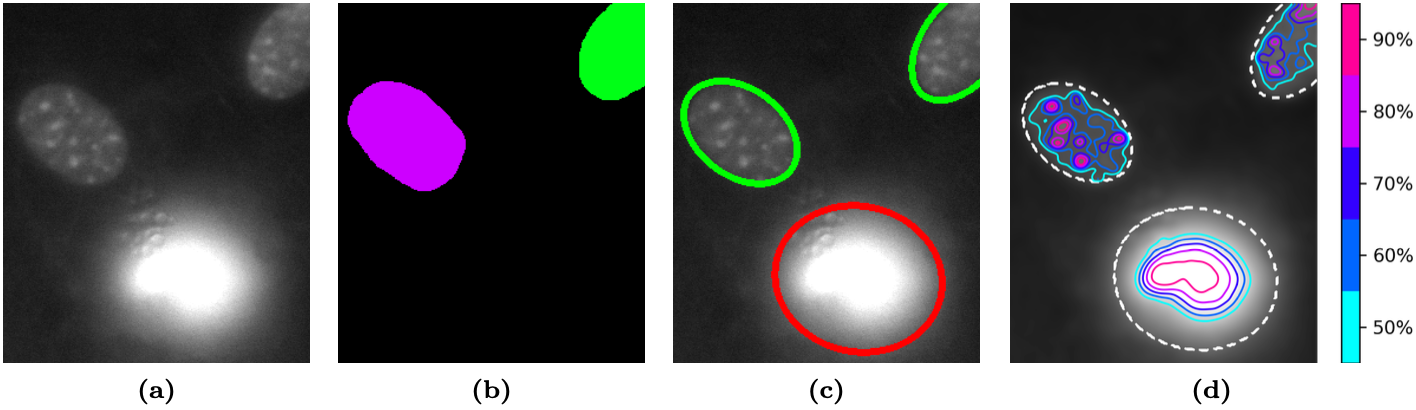
Autofluorescence artifact detection method. (a) Original image section (NIH3T3 cells, contrast-enhanced). (b) Ground truth segmentation. (c) Segmentation result of cell nuclei (green contour) and the autofluorescence artifact (red contour). (d) Smoothed image intensities (Gaussian filter) and the corresponding intensity profiles (solid contours) of the detected objects (dashed contours).
postprocess/glare_detection_smoothnessThe standard deviation of the Gaussian function used for smoothing the image intensities of the segmented object. Defaults to 3.
postprocess/glare_detection_num_layersThe number of intensity values, for which the connectivity of the intensity-superlevel sets is investigated. Defaults to 5.
postprocess/glare_detection_min_layerThe top fraction of the Gaussian-smoothed intensity profile investigated for connectivity. Defaults to 0.5, i.e. the top 50% of the Gaussian-smoothed intensity profile is investigated.
postprocess/min_glare_radiusThe size of a segmented object must correspond to a circle at least of this radius (in terms of the surface area) in order for the object to be possibly recognized as an autofluorescence artifact. Defaults to infinity, or to
AF_min_glare_radius × radiusif configured automatically (andAF_min_glare_radius defaultsto infinity).postprocess/min_boundary_glare_radiusOverrides
postprocess/min_glare_radiusfor objects located directly on the image border. Defaults to the value of thepostprocess/min_glare_radiushyperparameter.
- ENABLED_BY_DEFAULT = True
- configure_ex(scale, radius, diameter)
Automatically computes the default configuration entries which are dependent on the scale of the objects in an image, using explicit values for the expected radius and diameter of the objects.
- Parameters:
scale – The average scale of objects in the image.
radius – The average radius of objects in the image.
diameter – The average diameter of objects in the image.
- Returns:
Dictionary of configuration entries of the form:
{
    'key': (factor, default_user_factor),
}
Each hyperparameter
keyis associated with a new hyperparameterAF_key. The value of the hyperparameterkeywill be computed as the product offactorand the value of theAF_keyhyperparameter, which defaults todefault_user_factor. The value given forfactoris usuallyscale,radius,diameter, or a polynomial thereof. Another dictionary may be provided as a third component of the tuple, which can specify atype,min, andmaxvalues.
- process(input_data, cfg, out, log_root_dir)
Runs this pipeline stage.
- Parameters:
input_data – Dictionary of the inputs declared by this stage.
cfg – The hyperparameters to be used by this stage.
out – An instance of an
Outputsub-class,'muted'if no output should be produced, orNoneif the default output should be used.log_root_dir – Path of directory where log files will be written, or
Noneif no log files should be written.
- Returns:
Dictionary of the outputs declared by this stage.